
How to add a second partner: Difference between revisions
| Line 73: | Line 73: | ||
==== Using the crossroads (map P01P01A) as an example. ==== | ==== Using the crossroads (map P01P01A) as an example. ==== | ||
Step 1: Open the Enter scene and scan for (2 Acts) sectors | Step 1: Open the Enter scene and scan for (2 Acts) sectors | ||
[[File:T2.png|frameless|600x600px]] | |||
Step 2: Click the S checkbox to single-out the sector. (You can ignore any sectors that only have Bidoof + Sunflora) | |||
[[File:T3.png|frameless|600x600px]] | |||
[[File:T3.png | |||
Step 3: Add the actor of your second partner. Make sure that | Step 3: Add the actor of your second partner. Make sure that | ||
| Line 91: | Line 85: | ||
# “kind” is “ATTENDANT_MANAFI” (this will line up with the pokemon ID 16 in your recruitment list, which is Growlithe in my case) | # “kind” is “ATTENDANT_MANAFI” (this will line up with the pokemon ID 16 in your recruitment list, which is Growlithe in my case) | ||
# The actor’s sector is the same as the player and ATTENDANT1 | # The actor’s sector is the same as the player and ATTENDANT1 | ||
# They are facing the same direction as the player and ATTENDANT1 [[File:T5.png | # They are facing the same direction as the player and ATTENDANT1 [[File:T5.png|frameless|600x600px]]<br /> | ||
Step 4: Repeat for every (2 acts) sector (except the bidoof+sunflora) on every overworld map. In vanilla this includes: | Step 4: Repeat for every (2 acts) sector (except the bidoof+sunflora) on every overworld map. In vanilla this includes: | ||
Revision as of 20:13, 27 March 2026
How to Implement a Second Partner in SkyTemple
Who this guide is for: People who want to have a second partner, for a total party of three pokemon for your ROM Hack. This may work to have a party of four as well but I have not tested it.
Considerations:
- Having a three member party also means having more pokemon talking and being present in cutscenes, thus more scripting and writing on your part.
- If the Chimeco Assembly is enabled, the player will be able to remove the second partner. You can either let them do this, or delete the Chimeco Assembly.
Google Docs Version:
Adding a Pokemon To Your Starting Party (Credit: @Ajifer on the SkyTemple Discord)
- Download this patch by Adex (please credit appropriately): https://github.com/Adex-8x/EoS-ASM-Effects/blob/main/special_processes/monster_entry/add_mentry_to_party.asm
- The above is a custom special process. In order to import custom special processes, you'll first need to apply the patch "ExtractSPCode" from Patches > ASM (double click) > Utility.
- That will let you go to Patches > ASM > Special Process Effects (From the dropdown), where you'll have to (in the second tab) add a new effect ID with the [+], import code to that ID to then in the first tab, add a new special process that you'll give the effect ID to.
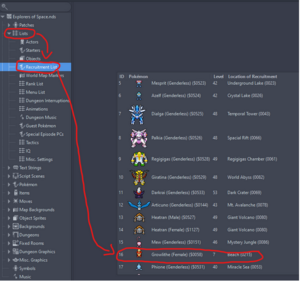
- In the dropdown menus on the left, go to Lists > Recruitment List. Scroll to the pokemon with the ID 16 (it should be a Manaphy assuming you haven’t changed it.)
- Click on the pokemon’s name and change it to whatever species you’d like. In the example below, I changed it from Manaphy to Growlithe.
- You may also want to change the default level and the recruitment location. If you change the recruit location to “Beach (0215)”, then if the recruit gets ko’d in a dungeon, it counts as a party wipe.
- 5. Add the following script to any cutscene after the tutorial dungeon (ie Beach Cave). For some reason the game will crash if you do so before Beach Cave. I personally put it in the cutscene before the first Koffing-Zubat fight and it worked.

ProcessSpecial(PROCESS_SPECIAL_PREPARE_MENU_ACCEPT_TEAM_MEMBER, 16, 0) ) { }switch ( message_Menu(MENU_ACCEPT_TEAM_MEMBER) )
ProcessSpecial(64,5,0);
***Replace the ‘64’ in ProcessSpecial(64,5,0) with whatever the ID of the special process effect is. For me it just happened to be 64. (I think by default it’s 62 but I may be wrong.)
Those three lines will give the player a prompt to either accept or deny the second party member. To force the play to pick yes, paste this script (written by Ajifer)
§label_5;
CallCommon(CORO_MESSAGE_CLOSE_WAIT_FUNC);
switch ( ProcessSpecial(PROCESS_SPECIAL_PREPARE_MENU_ACCEPT_TEAM_MEMBER, 16, 0) ) { }
switch ( message_Menu(MENU_ACCEPT_TEAM_MEMBER) ) {
case 1:
default:
//Player said yes to accepting the partner
//Celebrations for the partner joining.
//Script continues here, ending with an end; or you can add a jump @label_6 to continue further down for clarity.
ProcessSpecial(64,5,0);
jump @label_6;
case 2:
//Player said no to accepting the partner
//Guilt trip the player into reconsider, have the question asked again
jump @label_5
;}
§label_6;
Congrats! Now this pokemon is the third member of your party in dungeons.
Having the Second Partner Follow You In the Overworld
In every “enter(sse)” scene of every overworld map, do the following:
- Go to the “sectors” list in the top-right.
- Find any sectors with 2 actors listed (player + Attendant1).
- Add actor “ACTOR_ATTENDANT_MANAFI” at the same location as those 2 actors. This will be the second partner’s “spawn point” whenever the player enters that map.
Using the crossroads (map P01P01A) as an example.
Step 1: Open the Enter scene and scan for (2 Acts) sectors

Step 2: Click the S checkbox to single-out the sector. (You can ignore any sectors that only have Bidoof + Sunflora)

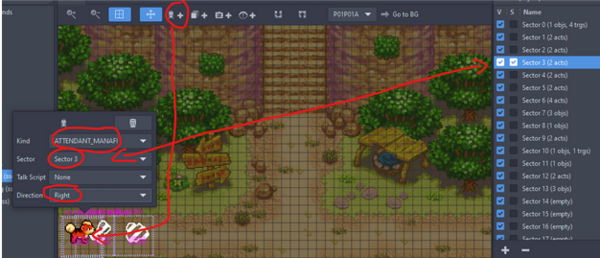
Step 3: Add the actor of your second partner. Make sure that
- “kind” is “ATTENDANT_MANAFI” (this will line up with the pokemon ID 16 in your recruitment list, which is Growlithe in my case)
- The actor’s sector is the same as the player and ATTENDANT1
- They are facing the same direction as the player and ATTENDANT1

Step 4: Repeat for every (2 acts) sector (except the bidoof+sunflora) on every overworld map. In vanilla this includes:
- Every Guild Floor and Room
- The Crossroads
- Spinda’s Cafe
- Both Town maps + Sharpedo’s Bluff
- The beach and path to the beach
- The outside of the guild
- I’m certain I’m missing some later on in the game. Like anytime you get to encounter a Kangaskhan Rock in the middle of or before a dungeon.
Other Tips:
- If you ever see “ProcessSpecial(PROCESS_SPECIAL_SET_TEAM_SETUP_HERO_AND_PARTNER_ONLY,0,0);” Make sure to delete it/comment it out or else it will reset your party.
- You can refer to the second partner in dialogue using the “[c_name:UNIT_NPC1]” variable.
- To have the second partner talk, use “ACTOR_UNIT_NPC1”. For ex.
message_SetFace(ACTOR_UNIT_NPC1, FACE_NORMAL, FACE_POS_STANDARD);
message_Talk({
english=" No worries little buddy![K] Just be careful ya hear!",
});
4. You use the actor “UNIT_NPC1” in cutscenes/scene editors to refer to the second partner.
5. When on the Overworld, for non-dialogue script (like turning or moving in an overworld cutscene), you refer to the second partner as “ACTOR_ATTENDANT_MANAFI” instead. For ex.
MovePositionOffset<actor ACTOR_ATTENDANT_MANAFI>(1, 15, 0);
6. The player’s bedroom only has two beds in it. You can add a third by replacing the map background with this one drawn by @Basealeios (please credit appropriately)
https://imgur.com/gallery/3-bed-bedroom-pmd-eos-T4I9Ktb
7. When testing, you may need to re-recruit/add the second partner to the party every time. For ex. If you’re starting your testing in Main 3, but the partner was added in Main 1, then the game will crash when it tries to call UNIT_NPC1 because it hasn’t been defined as of playing Main 3. You can resolve this by copy/pasting the below script at the beginning of Main 3 (or whatever Main you’re starting from)
§label_5;
CallCommon(CORO_MESSAGE_CLOSE_WAIT_FUNC);
switch ( ProcessSpecial(PROCESS_SPECIAL_PREPARE_MENU_ACCEPT_TEAM_MEMBER, 16, 0) ) { }
switch ( message_Menu(MENU_ACCEPT_TEAM_MEMBER) ) {
case 1:
default:
//Player said yes to accepting the partner
//Celebrations for the partner joining.
//Script continues here, ending with an end; or you can add a jump @label_6 to continue further down for clarity.
ProcessSpecial(64,5,0);
jump @label_6;
case 2:
//Player said no to accepting the partner
//Guilt trip the player into reconsider, have the question asked again
jump @label_5
;}
§label_6;